- Open your Ms Excel File, or make a new data with Ms Excel 2007 or 2010
- Open Review Tab, on Changes group menu click Protect Sheet.
- In a Window, activated Protect Protect Worksheet and contents of locked cells. Enter the password to protect your data, and than uncheck all option.
- Enter your password again, click OK
- Done!
How to Make Ms Excel Data Can’t Click or Read Only

How to Create PDF File document with Microsoft Office 2010
1. Open your word file document.
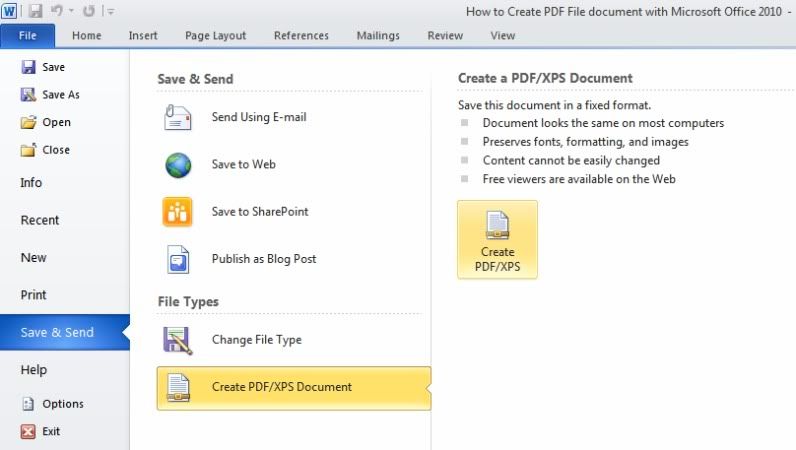
2. Please select File menu, and than Save & Send - Create PDF/XPS Document
then on the right-side Click Create a PDF/XPS.

3. In the prompt, Choose a location and name. Next Click Publish.

4. Done! Your document is now saved as a PDF.
2. Please select File menu, and than Save & Send - Create PDF/XPS Document
then on the right-side Click Create a PDF/XPS.
3. In the prompt, Choose a location and name. Next Click Publish.

4. Done! Your document is now saved as a PDF.